

To save money on flights and reservations from an Android device, it is essential to combine a few tricks: clearing cache and cookies, using comparison sites, and, above all, using a VPN to change your location. Below, we will explain why prices fluctuate and how you can use specific tools on your Android device to prevent airline algorithms from inflating prices. Everything you need to know to travel more cheaply is right here.
Why do flight prices change constantly?
Understanding pricing logic is vital to getting better deals. Airlines use a yield management system rather than fixed prices. Essentially, this is an algorithm that adjusts rates in real time based on supply, demand, and user profile.
This mechanism analyzes your data whenever you search from your Android device. It takes into account how far in advance you book, your destination, and where you are connecting from. If the system detects, through your IP address or cookies, that you have visited the same offer several times, it assumes that you are very interested. This often causes an artificial price increase to create urgency and force you to buy. Do not forget that your smartphone is not just a screen; it's also a source of information that companies use to calculate how much you are willing to pay.
The best tips to find cheap flights and book at the best price from an Android device
Several habits and settings on your Android device act as a first line of defense against these price increases. Here are the key ones.
Turn on incognito mode or clear your cookies before searching
This is the most basic step, but it is essential. Travel websites install cookies on your browser to track your browsing history. If you search for a flight in the morning and repeat the search in the afternoon, the website knows you are interested and may show you a higher price.
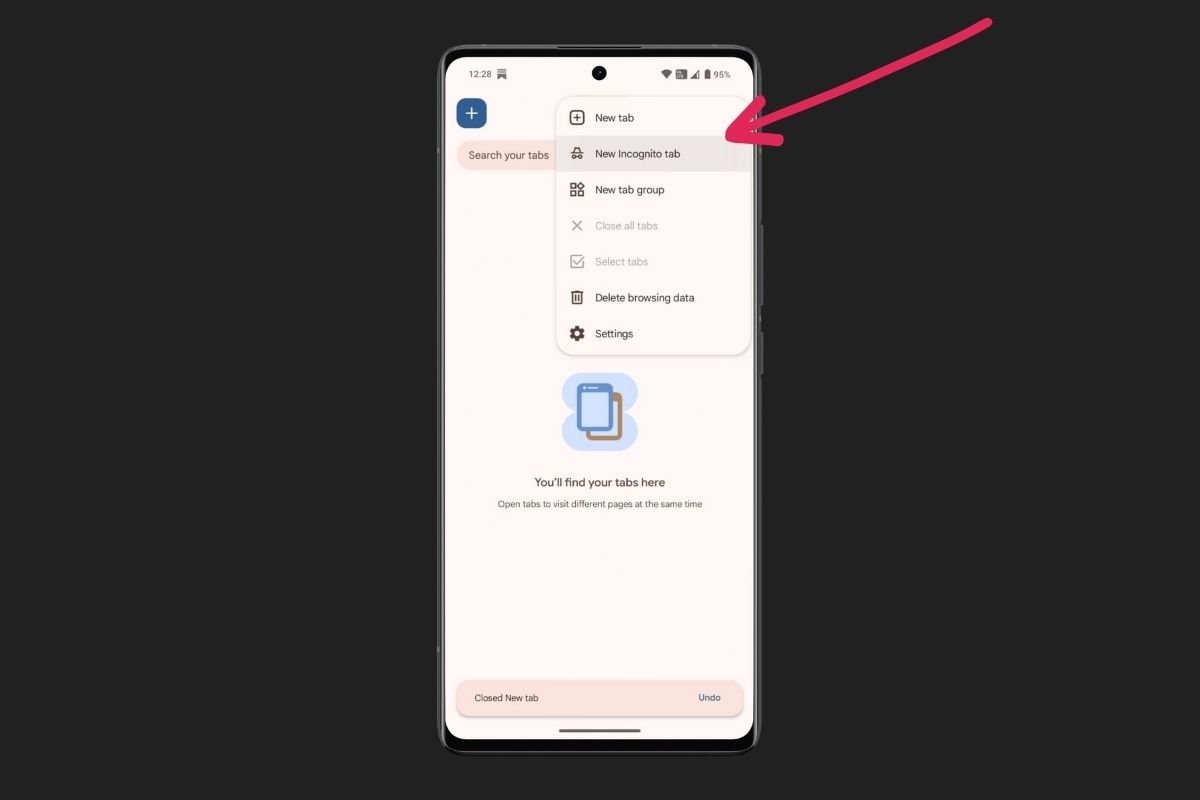 An incognito tab can help you find the best prices
To avoid this, perform your searches in incognito mode. On Android, this is simple:
- Open a web browser, such as Chrome.
- Tap the three vertical dots in the upper corner.
- Select New Incognito Tab.
If you would rather not use this mode, you can also manually delete your browsing data in your browser's privacy Settings before each new search. This resets your digital identity with the airline.
Use flight price comparison websites
Instead of hopping from one website to another, use apps or online platforms that compare all the offers. Flight comparison websites track hundreds of airlines simultaneously to show you the cheapest options.
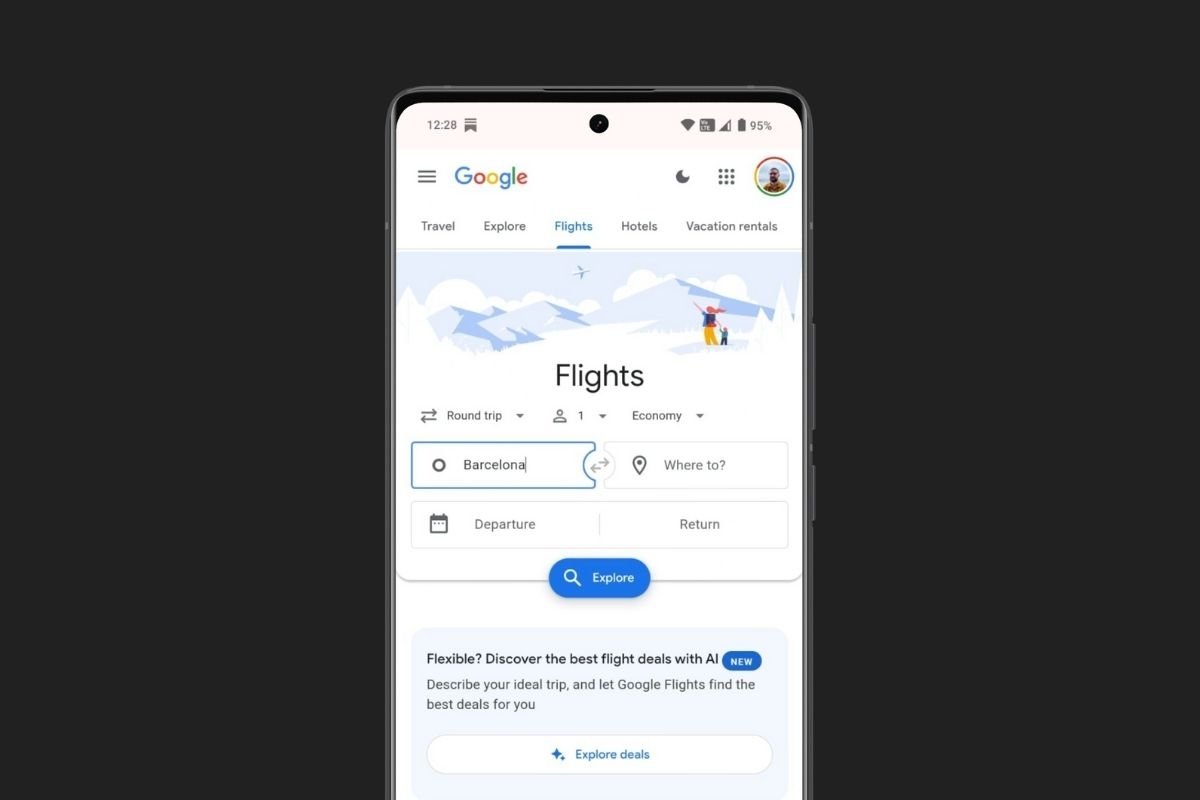 Google has its own price comparer, but you can use any other one
Tools like Google Flights or Skyscanner are essential on Android devices. You can use them to view prices on a calendar, which is vital, as flying a day earlier or later can mean significant savings. Also, you can set up alerts to receive notifications when a price drops. However, keep in mind that these comparison sites still show you the price set for your actual location (wherever you are). To break through that barrier, you will need the VPN trick explained below.
Choose direct flights or flights with strategic stopovers
Comfort comes at a price. When searching from your Android device, use the filters to see options with stopovers. Often, making a brief stop at a secondary airport or connecting hub can significantly reduce the final fare.
Sometimes it is better to fly to a city near your destination and complete the journey by train or bus. It is a matter of using the maps on your smartphone to calculate whether the extra time is worth the financial savings, which can be very significant on transoceanic flights.
Take advantage of airline loyalty programs
Having the official airline apps installed is not only useful for boarding; many companies also launch exclusive flash sales for app users that do not appear on their websites.
Sign up for their loyalty programs. Even if you are not a frequent traveler, being connected as a member often unlocks direct discounts on the base fare. Set up notifications on your Android device to be alerted about these offers, as these offers often only last a few hours.
The ultimate trick: use a VPN to get better prices on flights
IfIf you have tried the above tricks and the result is not satisfactory, it is time to use an additional tool to help you change the price: a VPN. This method makes all the difference by allowing you to overcome geographical barriers.
Why location affects flight prices
The price of a ticket depends on where you buy it. Airlines segment the market by country based on purchasing power and local currency. The same seat can cost $500 if you buy it from a European country, but much less if you simulate being in a country with a weaker currency or lower living costs.
When browsing with your normal connection, the airline detects your IP address and assigns the corresponding price. By changing your IP with a VPN, you can access hidden regional rates.
How to use Planet Free VPN to change your location on Android
To leverage this, you need an app that securely masks your location. Planet Free VPN is an ideal choice because it does not require complex registration and offers a stable connection for processing payments.
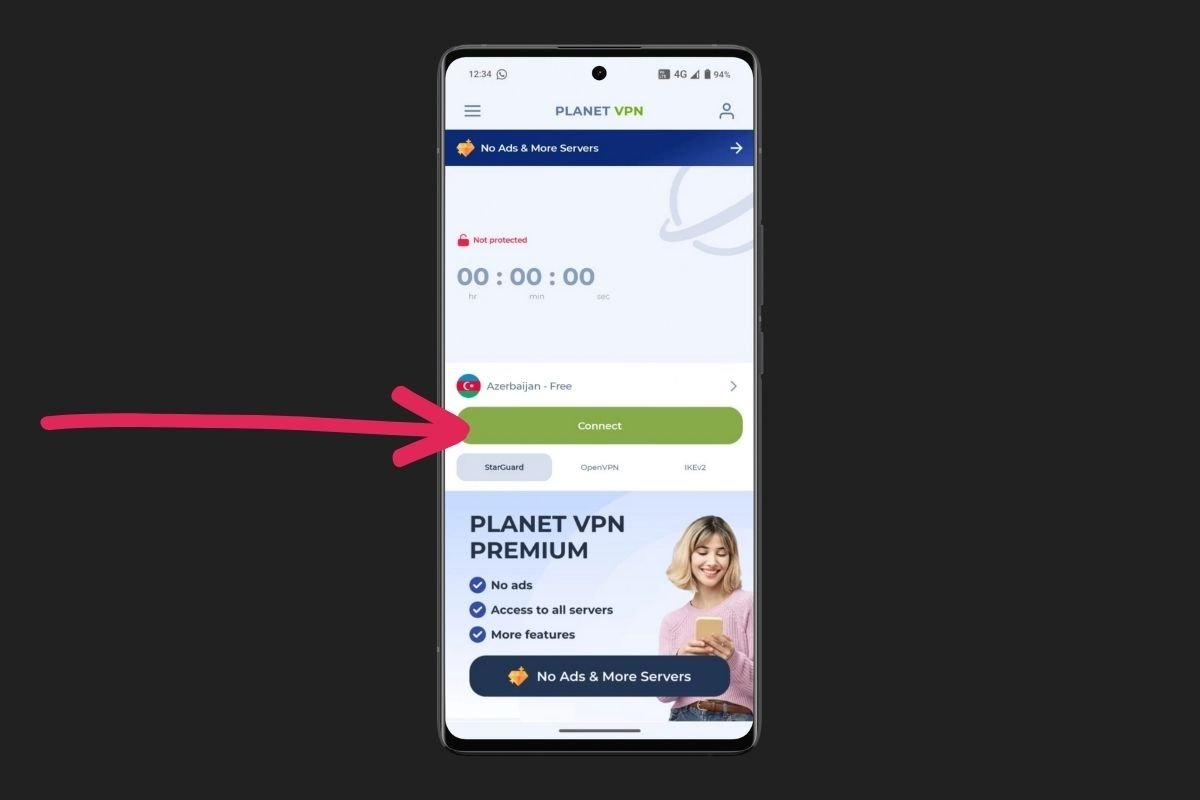 Planet VPN is a great option to connect from other countries with weaker currencies
Using this app on your Android device is very simple:
- Download Planet VPN for Android.
- Open the app; you will see your current location.
- Select a server from the list of countries. Below, we tell you which ones to choose.
- Tap Connect and wait for the app to confirm the IP change.
With Planet Free VPN enabled, reopen your browser in incognito mode and search for the same flight. You will most likely see a different amount.
The best countries to search for cheaper flights with a VPN
Choosing the right server is key. To maximize savings, target these regions:
- Countries with lower currency value. Connecting to servers in India, Turkey, Argentina, or Malaysia usually yields cheaper results, as rates are adjusted downward for the local market.
- The airline's country of origin. If you are flying with a foreign airline, connect to a server in their country. Sometimes they offer preferential domestic rates.
- The destination country. If you are traveling to a specific destination, try connecting to a server there. Algorithms may interpret you as a returning resident, triggering different rates than those for tourists.
And you, have you ever noticed how the price changed when using these tricks? Tell us about your experience in the comments! Share your findings so we can all travel more for less.
